
For the installation, you need an empty server with Ubuntu 24.04 or 22.04 or Debian 12 or 11 with root access.
Install CloudPanel
Login via SSH to the Server.
If you are using a private key to login, the SSH command would be:
ssh -i path_to_your_private_key root@yourIpAddress
If you are using a password to login, the SSH command would be:
ssh root@yourIpAddress
Before running the installer, we need to update the system and install the required packages.
apt update && apt -y upgrade && apt -y install curl wget sudo
- Ubuntu 24.04 LTS
- Ubuntu 22.04 LTS
- Debian 12 LTS
- Debian 11 LTS
Run the installer with your preferred Database Engine.
- MySQL 8.0
- MariaDB 11.4
- MariaDB 10.11
curl -sS https://installer.cloudpanel.io/ce/v2/install.sh -o install.sh; \
echo "a3ba69a8102345127b4ae0e28cfe89daca675cbc63cd39225133cdd2fa02ad36 install.sh" | \
sha256sum -c && sudo bash install.sh
Access CloudPanel
Security
For security reasons, access CloudPanel as fast as possible to create the admin user. There is a small time window where bots can create the user.If possible, open port 8443 only for your IP via firewall.
You can now access CloudPanel via Browser: [URL unfurl="true"]https://youripaddress:8443[/URL]
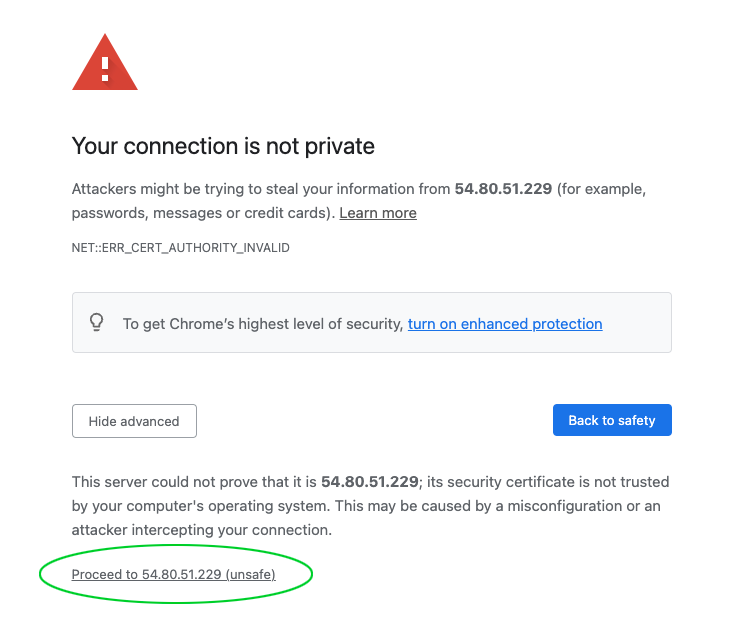
Ignore the self-signed certificate warning and click on Advanced and Proceed to continue to CloudPanel.
Edit this page